Introduce tu CP y ve tu tienda más cercana

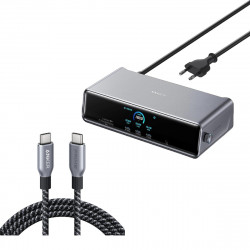
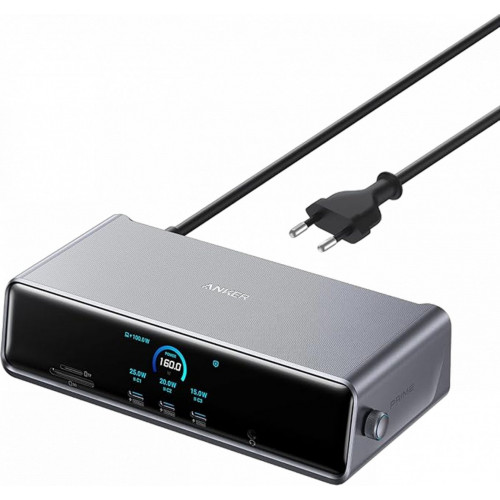
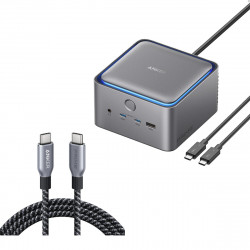
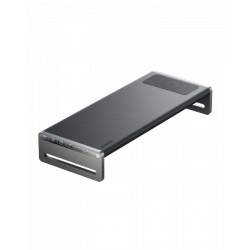
Anker Prime Docking Station (14-in-1, Triple Display, DisplayLink) with DL7400

Marca: Anker

285,00€

En stock

  • Envío en 24-48 h en Península, gratis desde 60€
  • Sin IVA: 285,00€
14 Powerful Connections: Designed for modern setups, featuring a 140W 10Gbps USB-C upstream port, two 100W 10Gbps USB-C ports, one 100W 5Gbps USB-C port, two HDMI ports, one DisplayPort, two 5Gbps USB-A ports, one 480Mbps USB-A port, a 2.5Gbps Ethernet port, a headphone and mic combo jack, plus SD and TF card slots for complete desktop connectivity. One 8K Output, Triple Display Versatility: Power up three external monitors at once, including one in 8K, for ultra-efficient multitasking. Compatible with both macOS and Windows setups. (Note: Only monitors that support 8K resolution can display in 8K. DisplayLink driver required.) Each Port Powers and Performs: Every USB-C port supports both charging and data transfer. Power your laptop with up to 140W via the upstream port, while each front USB-C port delivers 100W of high-speed charging. (Note: The front USB-C ports do not support media display.) Always Cool, Always in Control: View real-time updates on charging power, display performance, fan cooling mode, and settings directly from the smart display. The built-in fan and ActiveShield 3.0 help keep your device running cool and stable. What You Get: Anker Prime Docking Station (14-in-1, Triple Display , DisplayLink), USB-C to USB-C 3. 2 Gen 2 cable for upstream port (3.3 ft, 10 Gbps), 6ft AC power cord , safety sheet with user manual QR code , 24 -month warranty , and our friendly customer service.
Ficha técnica
MarcaAnker
ModeloA83B33A1
J
J.T. 25/02/2026

Dock works fine. One strange issue is that when the laptop screen blanks, the other screens will blank as well, but they will also disconnect. So when you wake up the screen (the laptop is NOT asleep), the screens will need to reconnect after making the sound about usb devices connecting.

C
C.L. 24/02/2026

Love the device and it works to drive three monitors well for my MacBook.

J
J.H. 23/02/2026

I replaced a HyperDrive 10 port hub that suddenly developed power issues about a month after the warranty expired. All devices connected to it would suddenly disconnect. Only lasted 2 years for the price. This Anker Prime was recommended while researching a replacement. So far it is working 10x better than its Hyper Technologies predecessor. The Hyper product always ran hot. No cooling fan. This one has a cooling fan and thus has a larger profile. But that's not a problem for my purposes and the fan runs very quiet. It's easy to setup and while it's running it serves dual duty as a desktop clock. It is a little pricey too. But if you need to connect two displays to the Apple Silicon MacBooks, this seems to work well. An updated DisplayLink driver for the latest flavor of macOS and it was up and running. I'm running two Samsung 1080p displays, two external USB HDs, and a couple of multi-port USB hubs for peripherals without any issues.

A
A.H.M. 19/02/2026

I have a mid-tower PC that has one USB-C/Thunderbolt port on the back. I was hoping this would allow me to have several USB-C ports for power and data *and* SD/Micro SD card readers that would be easily accessible on my desktop. I don't need the video outputs and Ethernet.I never got around to testing the USB-C data speeds because the first thing I tried was the SD card reader. It topped out at 89 MBps. When I plugged my SD card reader directly into that same port with a Lexar SD card reader it was almost 250 MBps.I have confirmed with Anker support that the SD reader in this docking station specs out at 104 MBps. That's a shame. I'm returning it since that was one of the things I was really wanting it for.I guess I'm back to looking for a desktop USB hub that just has a few USB-C/A ports with charging and data and card readers in something that looks like it should be on my desk.

J
J.P. 17/02/2026

I use this docking station for connecting my MBPro to 3 external monitors, 2 HDMI and 1 DP. The DisplayLink functionality works great but does have some limitations. To dock the MBPro, if you want to use the external monitors with the lid closed, you have to connect it to the dock with the lid open first, then close it to only use the monitors. Not a big deal if you're docked most of the time, but kind of annoying if you undock frequently.The dock itself is very well made and unique. I like having the screen on the front displaying the time and the wheel on the side allows for easy navigation to the different menus and information. The layout of the ports is great and allows you to access them easily without having to move things around often. The incorporated power supply is great which means there's no external brick to try and hide or have sit on the floor collecting dust, just one power cable from the wall to the dock.Anker did well with this dock and I'll definitely be looking to their Thunderbolt dock when monitors with thunderbolt eventually drop in price.

Escribe tu opinión

El código HTML no está permitido.
Mala Buena
Volver

Envío

Envío en 24-48 h en Península por 4,95€ y gratis desde 60€. Priorizamos la entrega con nuestros propios instaladores. Ver política de envíos.

Devoluciones

Derecho de desistimiento de 14 días naturales según la normativa española. Ver política de devoluciones.

Productos recomendados

Ver todo
Preguntas frecuentes

¿Cuánto tarda el envío?

Envío en 24-48 h laborables en Península (4,95€, gratis desde 60€). Baleares: 7-10 días laborables. Resto de la Unión Europea: 3-7 días laborables.

¿Quién realiza la instalación?

Priorizamos la entrega con nuestros propios instaladores, que se encargan de la puesta en marcha del gran electrodoméstico.

¿Puedo recoger mi pedido en tienda?

Sí. Introduce tu código postal para ver tu tienda EuroVolter más cercana y elegir la recogida en tienda.

¿Cómo puedo devolver un producto?

Dispones de 14 días naturales para ejercer el derecho de desistimiento. Escríbenos a indicando tu número de pedido.